A Complete Guide to Native Execution, Emulation, and Cross-Compilation
Learn the fundamentals of native code programming, machine code, CPU architecture, ARM vs x86, emulation, and cross-compilation with real-world software engineering examples from Sheraian Limited.
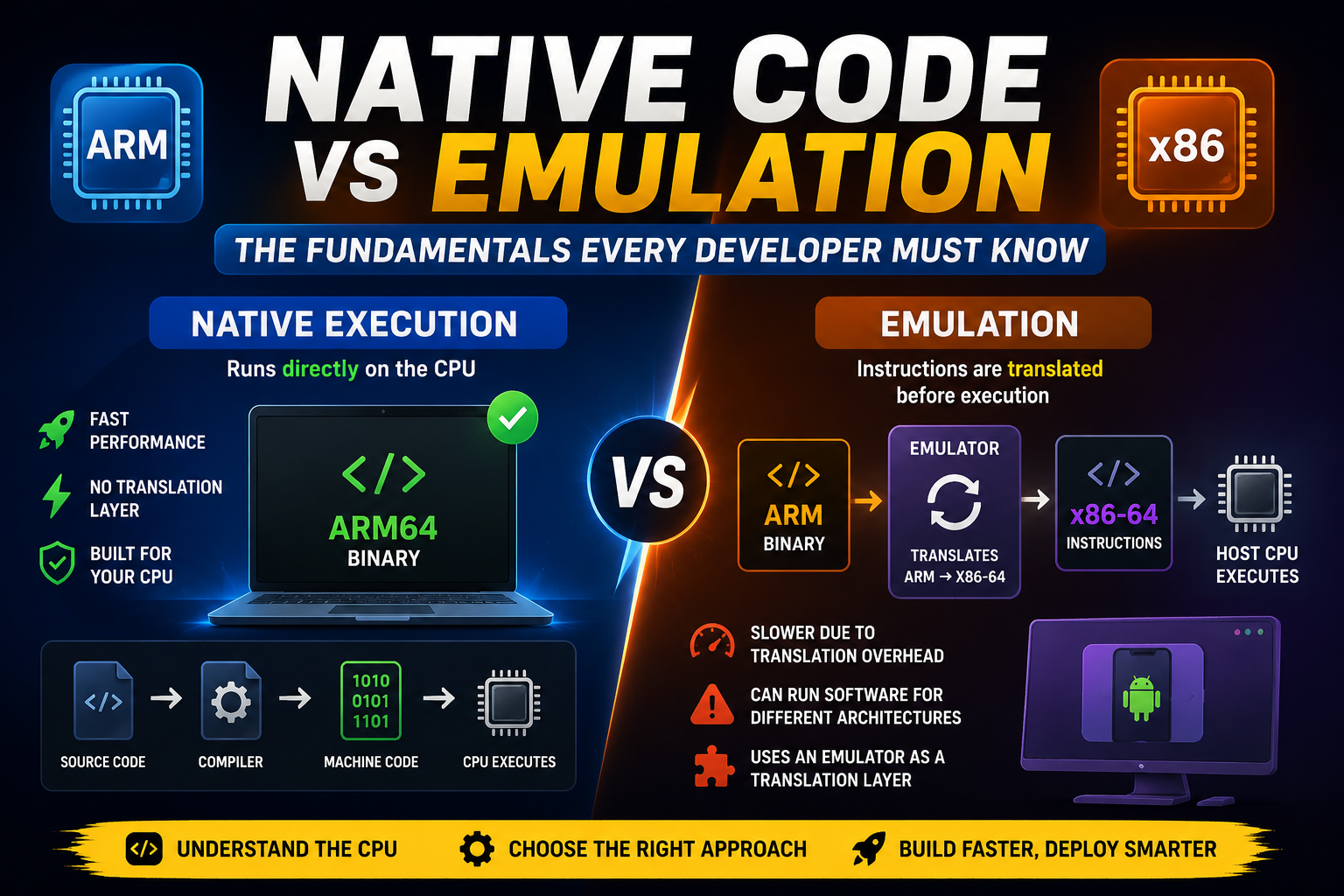
A Complete Guide to Native Execution, Emulation, and Cross-Compilation
Modern software development involves more than writing code. Understanding native code programming, CPU architecture, and code execution is essential for building efficient, high-performance applications.
Whether you're developing software for ARM64, x86-64, mobile devices, cloud servers, or embedded systems, understanding how native code works will help you make better engineering decisions.
In this guide, we'll explore native execution, machine code, emulation, and cross-compilation, along with real-world examples that software engineers encounter every day.
What Is Native Code?
Native code is machine code that has been compiled specifically for a particular CPU architecture, such as ARM, ARM64, x86, or x86-64.
Because native code is built for a specific processor, it runs directly on the hardware without requiring an emulator or translation layer.
For example:
- ARM applications run natively on ARM processors.
- x86 applications run natively on Intel or AMD processors.
Native execution delivers the highest possible performance because the CPU executes the instructions directly.
The CPU Only Speaks One Language
A common statement in computer architecture is:
"The CPU only speaks one language: machine code."
At the hardware level, processors execute only binary machine instructions.
Every programming language eventually becomes machine code before the processor can execute it.
High-Level Languages
Languages such as:
- Python
- Java
- C++
- JavaScript
are designed to be readable and easy for humans.
Example:
print("Hello, World!")
Assembly Language
Assembly language is a human-readable representation of machine instructions.
Example:
MOV AX, 5
ADD AX, 3
Each assembly instruction maps closely to machine instructions executed by the CPU.
Machine Language (Binary)
Machine language consists entirely of binary digits (0s and 1s).
Example:
10110000 00000101
This is the only format the processor can execute directly.
Why Does Code Need Translation?
When developers write programs, the CPU cannot execute the source code directly.
Instead, it must first be translated into machine code.
Compiled Languages
Languages such as C and C++ use a compiler to convert source code into native machine code before execution.
Interpreted Languages
Languages such as Python use an interpreter (and often a virtual machine) that ultimately executes machine code on the CPU.
Regardless of the language you write, everything eventually becomes machine instructions.
A Simple Analogy
Imagine the CPU is a person who understands only one language.
You speak English (your programming language).
A translator (compiler or interpreter) converts your instructions into the CPU's native language.
Only then can the CPU understand and execute your program.
What Is Emulation?
Emulation is the process of making one computer system behave like another.
An emulator translates instructions from one Instruction Set Architecture (ISA) into another while the program is running.
For example:
An Android application compiled for an ARM processor cannot run directly on an x86-64 desktop.
The emulator performs this process:
ARM Instruction
       │
       ▼
   Emulator
(ARM → x86-64 Translation)
       │
       ▼
Host CPU Executes x86 Instructions
This translation happens continuously while the application is running.
Why Do We Need Emulation?
Each processor understands only its own instruction set.
Without emulation, software compiled for one architecture cannot execute on another.
Common examples include:
- Running Android ARM applications on x86 computers.
- Playing classic console games on modern PCs.
- Running legacy operating systems.
- Testing mobile applications on desktop simulators.
Native Execution vs. Emulation
Native ExecutionEmulationRuns directly on the CPUInstructions are translated before executionFastest possible performanceSlower because of translation overheadRequires matching CPU architectureSupports different CPU architecturesNo translation layerUses an emulator
Think of it like this:
Native execution is speaking directly with someone who understands your language.
Emulation is communicating through a live translator who must interpret every sentence before the conversation continues.
Real-World Examples Every Software Engineer Encounters
1. npm install on Apple Silicon (M-Series Macs)
Apple Silicon uses the ARM64 architecture, while many older Node.js packages were originally compiled for x86-64.
When native ARM binaries aren't available, your system may:
- Compile native code from source.
- Run x86 binaries using Rosetta 2.
- Fail because dependencies aren't compatible.
This is one reason npm install can be slower on Apple Silicon than on Intel-based Macs.
2. Docker Images and AWS Graviton
Suppose you build a Docker image on an x86-64 machine but deploy it to an ARM64 AWS Graviton server.
If your Docker image contains x86 binaries, the ARM processor cannot execute them directly.
Your choices are:
- Run the image using emulation (slower).
- Build an ARM64 image using Docker Buildx (recommended).
This is why multi-platform Docker images have become increasingly important.
3. Cross-Compilation
Instead of relying on emulation, developers often use cross-compilation.
Cross-compiling means generating machine code for one processor while compiling on another.
For example:
- Build on an x86 workstation.
- Generate an ARM64 executable.
- Run it natively on an ARM device.
Because the application is already compiled for the target processor, there is no runtime translation, resulting in significantly better performance.
Key Takeaways
Understanding native code programming, machine code, CPU architecture, emulation, and cross-compilation is fundamental for modern software engineering.
As software increasingly targets multiple platforms including ARM64 laptops, cloud servers, mobile devices, and embedded systems knowing when to use native execution, emulation, or cross-compilation helps developers build faster, more compatible, and more efficient applications.
Whether you're troubleshooting package installation issues, creating Docker containers, or deploying software across different processor architectures, mastering these concepts will improve both your development workflow and your understanding of how computers execute code.
About Sheraian Limited
At Sheraian Limited, we build scalable software solutions using modern technologies across web, mobile, cloud, and AI. Through our engineering blogs, we aim to simplify complex software development concepts and share practical insights that help developers and businesses stay ahead in today's rapidly evolving technology landscape.