Headless CMS vs Traditional CMS
Headless CMS separates content storage from presentation via an API, so one piece of content can serve a website, an app and a partner feed at once.
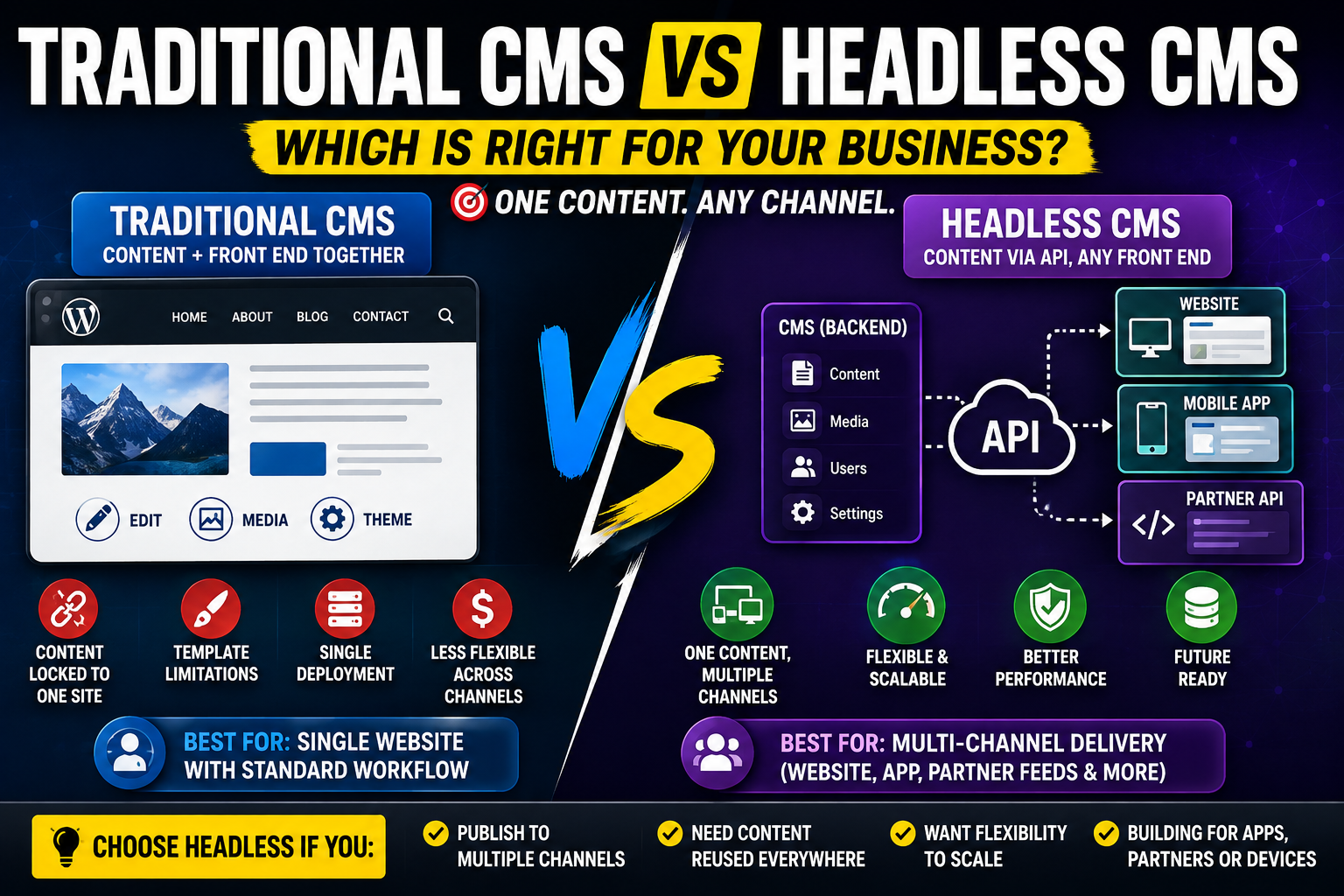
Headless CMS vs Traditional CMS
A traditional CMS couples content storage to a fixed front end, rendering pages itself, which suits a single website with a standard editorial workflow. A headless CMS stores content and exposes it through an API, letting any number of front ends, a website, an app, a partner feed, consume the same content. Choose headless when you genuinely publish to more than one channel; choose traditional when you do not.
What "headless" actually changes
In a traditional CMS, the system that stores your content is the same system that renders your pages: templates, themes, and the front end all live inside the CMS. In a headless CMS, those two responsibilities split. The CMS becomes a content API, and a separate front-end application, built in whatever framework suits the project, requests content from that API and renders it. Nothing about the editorial experience needs to feel different to a content editor, though the underlying architecture is fundamentally different.
There is also a middle category worth knowing: some platforms describe themselves as "decoupled" rather than fully headless, keeping a built-in front end available while also exposing an API for additional channels. This can be a reasonable stepping stone for a business that wants to keep its existing website working as-is while adding an app or partner feed, without committing fully to a separate front-end build for the main site.
Architecture
Traditional CMS platforms are monolithic: one codebase, one deployment, content and presentation tightly coupled. Headless CMS platforms are API-first: content lives independently of any specific front end, and multiple front ends can consume the same API simultaneously. This is the structural reason headless enables multi-channel publishing that traditional platforms were not built for.
Editor experience
A well-built headless CMS can offer an editing experience just as good as a traditional one, with rich text, media libraries, and content previews. The difference editors notice most is preview: because the front end is separate, previewing exactly how content will look on the live site requires the headless setup to specifically support live preview, which not every implementation does well. Evaluate this directly in a trial rather than assuming it is solved.
Ask specifically to see draft content previewed on the actual production front end, not a generic preview pane inside the CMS admin, before signing off on any headless platform. That specific test surfaces gaps that a sales demo of the content editor alone will not show.
Multi-channel delivery
This is headless's core advantage. One piece of content, a product description, a blog post, a help article, can be written once and delivered to a website, a mobile app, and a partner's API simultaneously, staying consistent across all three without manual duplication. A traditional CMS can technically expose an API too, but it is usually a secondary feature bolted onto a system designed for rendering its own pages, not a first-class capability.
Hosting and infrastructure
Traditional CMS hosting is generally simpler: one application, one server or managed host, one thing to keep patched. Headless setups require hosting the CMS backend and separately hosting and deploying the front-end application, which is more moving parts, more places to monitor, and more coordination between two deployments when content structure changes.
Cost
Traditional CMS platforms are usually cheaper to get running initially, since a themeable, off-the-shelf front end comes with the system. Headless setups cost more upfront because the front end is a separate, custom build, but that cost buys reusability across channels that a traditional CMS cannot offer without significant rework later.
Comparison table
Traditional CMSHeadless CMS ArchitectureMonolithic, content and presentation coupledAPI-first, content and presentation separate Editor experienceMature, built-in previewGood, but preview needs specific implementation Multi-channel deliveryLimited, usually a bolt-onNative, core design goal Hosting complexityLower, one applicationHigher, backend plus separate front end Initial costLowerHigher Best fitSingle website, standard workflowMultiple channels from one content source When headless is overkill
If you run one website, publish standard pages and blog posts, and have no near-term plan to serve content to an app or a partner feed, headless adds architectural complexity and cost without a corresponding benefit. The multi-channel advantage only pays for itself once there genuinely are multiple channels consuming the same content. Adopting headless "in case we need it later" is a common and avoidable overspend.
The hosting overhead compounds this. A headless setup means two systems to keep running, monitored, and updated instead of one, and a content-model change on the backend can require a coordinated front-end release to actually surface it. For a single-channel site, that extra coordination is pure overhead with nothing to show for it.
When headless earns its cost
A business already running a website and a mobile app that need to share product or content data, or a media business syndicating content to partner sites, gets immediate, measurable value from headless because the duplication it removes is real and ongoing, not hypothetical. Sheraian builds both headless and traditional CMS platforms, and the right recommendation depends entirely on whether your content genuinely needs more than one destination.
Frequently asked questions
Is headless CMS always more modern or better than traditional?
No. It is better suited to multi-channel publishing specifically. For a single website with a standard workflow, a traditional CMS is often the simpler, cheaper, equally capable choice.
Can a traditional CMS be converted to headless later?
Some traditional platforms offer API access that approximates headless behaviour, but a true headless architecture, with a separate front end, is usually a rebuild rather than a configuration change.
Does headless mean losing SEO capability?
No, but SEO fundamentals, meta tags, structured data, sitemaps, become the front end's responsibility rather than the CMS's, so the front-end build needs to implement them deliberately.
Is a headless CMS harder for non-technical editors to use?
Not inherently. A well-built headless CMS can have an editing interface as approachable as a traditional one. Live preview quality is the main area worth testing before committing.
Which is cheaper to run over several years?
It depends on channel count. For a single site, traditional is usually cheaper throughout. Once multiple channels are involved, headless avoids the duplicated build cost of maintaining separate content systems per channel.
Do I need headless just because we might build an app eventually?
Not necessarily. If the app is a genuine near-term plan, headless is worth the upfront investment. If it is a hypothetical "maybe someday," building headless now is usually premature cost.
What is the biggest implementation risk with headless CMS?
Underestimating the separate front-end build. The CMS itself is often the easier half of the project; the custom front end that renders content well across every needed channel is the larger piece of work.
Not sure which architecture fits your content needs? If you publish to one channel today with no concrete plan for more, traditional is the honest recommendation. Talk to Sheraian about your actual channels before committing to the more complex headless route.