What Should a Custom LMS Actually Include?
A custom LMS needs course authoring, enrolment, progress tracking, assessment and certification at minimum, plus SCORM and reporting for most.
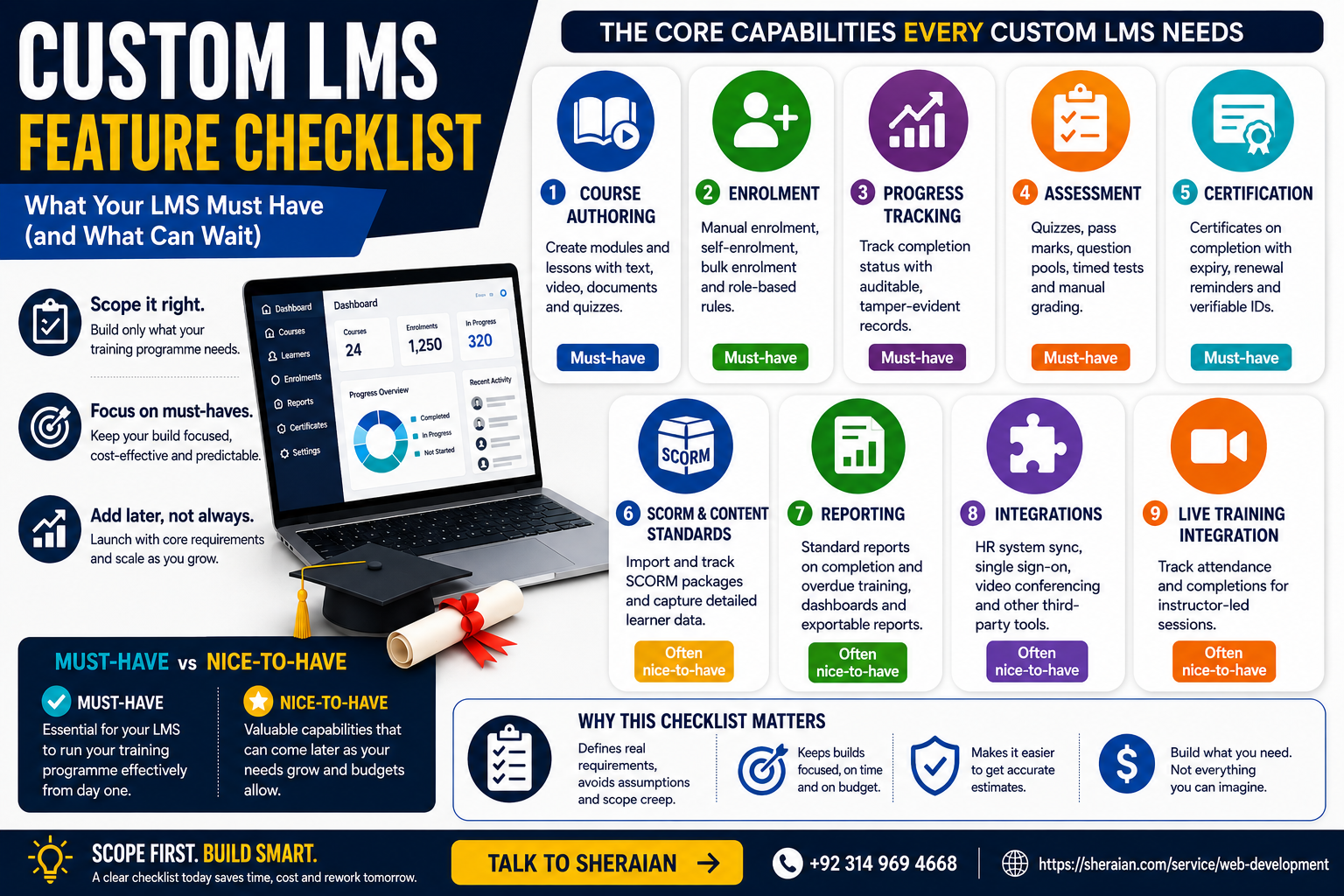
What Should a Custom LMS Actually Include?
A custom LMS needs, at minimum, course authoring, enrolment management, progress tracking, assessment, and certification. SCORM support, advanced reporting, and third-party integrations are usually necessary too, but their exact scope depends on your training programme. Treat this as a checklist to scope a build against, not a fixed feature list every LMS must include identically.
Why scoping requirements first matters
A custom LMS build without a clear requirements list tends to grow scope during development, as stakeholders each add features they assumed were included. Writing down what is genuinely required, versus what would be convenient, before development starts keeps the build focused and the budget predictable.
The categories below are the ones that come up in nearly every LMS scoping conversation Sheraian has, regardless of industry. Not every organisation needs every capability at full depth, which is exactly why the must-have versus nice-to-have distinction later in this article matters more than the list of categories itself.
Course authoring
The minimum requirement is the ability to structure a course into modules and lessons, with text, video, and document content. Beyond that minimum, consider whether your content team needs branching content paths, embedded quizzes within lessons rather than only at the end, or reusable content blocks shared across multiple courses.
Enrolment
Manual enrolment by an administrator is the baseline. Most organisations also need self-enrolment for open courses, bulk enrolment for onboarding cohorts, and enrolment rules tied to role or department so the right people are automatically assigned the right training without manual admin work every time someone joins.
Progress tracking
Learners and administrators both need visibility into completion status: which modules are done, in progress, or not started. For compliance-relevant training, tracking needs to be auditable, with timestamps and a record that cannot be silently altered, since that record may need to be produced during an audit.
Assessment
Quizzes with a pass mark are the standard requirement. Depending on your training, you may also need randomised question pools to reduce answer-sharing between learners, timed assessments, or manually graded submissions for open-ended answers that automated marking cannot handle.
Certification
A generated certificate on course completion is the baseline. Regulated or compliance-focused training usually also needs expiry dates with renewal reminders, and a verifiable record, sometimes a unique certificate ID, that can be checked by a third party such as an auditor or client.
SCORM and content standards
SCORM support matters specifically if you plan to use or reuse content built in third-party authoring tools, or if you need learner interaction data at a granularity beyond simple pass or fail. If all your content is built natively within the LMS, SCORM support is less critical, though it remains useful for future flexibility.
Reporting
Standard reports covering completion rates and overdue training cover most operational needs. Larger organisations, or those with compliance obligations, often also need exportable audit-ready reports, and role-specific dashboards so a department manager sees their team's status without administrator-level access to the whole system.
Integrations
The most common integration requirement is with an HR system, so enrolment can be driven automatically by role or department changes rather than manual re-entry. Single sign-on is a frequent requirement too, reducing password fatigue and simplifying access management for larger user bases.
Video conferencing integration is worth a specific mention for any programme that includes live, instructor-led sessions alongside self-paced content. Blended programmes that mix both formats need the LMS to track attendance at live sessions with the same rigour as completion of self-paced modules, which is easy to overlook when scoping focuses mainly on the self-paced side.
Must-have vs nice-to-have
CapabilityMust-haveOften nice-to-have Course authoringModules, lessons, basic content typesBranching paths, reusable content blocks EnrolmentManual enrolmentSelf-enrolment, bulk enrolment, role-based rules Progress trackingCompletion status per learnerFully auditable, tamper-evident records AssessmentQuizzes with pass markRandomised pools, timed tests, manual grading CertificationCertificate on completionExpiry, renewal reminders, verifiable IDs SCORMOnly if reusing external contentFull SCORM compliance for all content ReportingCompletion and overdue reportsExportable audit reports, role dashboards IntegrationsNone strictly required at launchHR sync, single sign-on Scoping your own build
Go through each row above and mark it required, useful, or not needed for your specific training programme. What remains after that exercise is your actual requirements list, usually shorter than a generic "everything an LMS could do" wishlist, and considerably cheaper to build because of it. Custom LMS vs Moodle vs TalentLMS is worth reading before this scoping exercise, since an established platform may already cover your finished list without a custom build at all.
Bring the finished list to any development conversation as a written document, not a verbal summary. A specific, written requirements list is what lets a development partner give you an accurate estimate, and it is what protects the project later if scope starts drifting during development.
Frequently asked questions
Do I need SCORM support if I am building all content natively?
Not immediately, though it is worth including for future flexibility if you might license third-party training content later. If all content stays native to your LMS indefinitely, it is a lower priority.
Is single sign-on worth building at launch or can it wait?
It can usually wait unless your organisation already mandates SSO for all internal tools. Adding it later is a contained piece of work that does not require restructuring the rest of the system.
How auditable does progress tracking need to be?
That depends entirely on whether your training is compliance-relevant. Genuinely regulated training needs tamper-evident, timestamped records; general skills training usually does not need that level of rigour.
Should I build bulk enrolment from day one?
If onboarding regularly involves cohorts of new starters, yes, since manual one-by-one enrolment becomes a recurring administrative burden quickly. For occasional individual enrolment, it can be added later.
What is the most commonly underestimated requirement?
Reporting, specifically exportable, audit-ready reports. Teams often assume a dashboard view is sufficient until an actual audit or client request requires a formatted export they had not planned for.
Can I launch with the must-have list only and add nice-to-haves later?
Yes, and it is usually the sensible approach. Launching with core requirements validates the system with real usage before investing in features that may turn out to be unnecessary.
How do I avoid scope creep once the requirements list is agreed?
Treat any new request during development as a candidate for a later phase unless it is a genuine correction to a missed must-have. Documenting the agreed list before development starts makes that distinction easier to hold to.
Not sure which of these your training programme genuinely needs? Work through the must-have versus nice-to-have table against your actual programme before committing to a full build. Talk to Sheraian to scope it properly, including whether an established platform already covers your list.